Learn basic coding in 7 days with this simple and beginner-friendly guide. This step-by-step plan is perfect for students and beginners who want to start coding from zero. You will learn what coding is, how it works, and how to write your first program using Python.
Learn Basic Coding in 7 Days (For Beginners)
In today’s digital world, coding is no longer just for engineers or tech professionals. Whether you want to build websites, create apps, or simply understand how technology works, learning basic coding can open many doors for you.
The best part? You don’t need months or years to get started. With the right approach, you can learn the fundamentals of coding in just 7 days.
This guide is specially designed for complete beginners—no prior experience needed.
Why Should You Learn Coding?
- Improves logical thinking
- Helps in problem-solving
- Opens career opportunities
- Useful for students in every field
- Makes you more confident with technology
Even if you don’t want to become a programmer, coding teaches you how to think smartly.
📅 Day 1: Understand What Coding Is
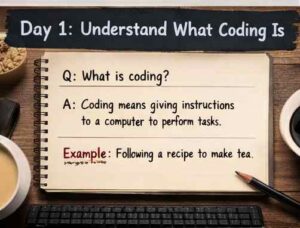
Coding simply means giving instructions to a computer so it can perform a task. Just like we tell someone step-by-step what to do, a computer also needs clear and exact instructions to work properly. 🤖
Think of coding like a recipe. If all steps are followed in the correct order, you get the right result. But even a small mistake can lead to errors, which is completely normal when you are learning.
Coding is done using programming languages like Python, Java, and C++. For beginners, Python is usually the best choice because it is simple and easy to understand. 🐍
👉 Focus for today:
- Understand what coding actually means
- Learn how a computer follows instructions
- Remove the fear that coding is too difficult
🚀 The goal of Day 1 is simple: build a clear understanding so that starting coding feels easy and not confusing.
👉 Practice Questions:
- What is coding? Explain in your own words (3–4 lines)
- Give one real-life example of step-by-step instructions
- What is a programming language? Write any 3 examples
- How does a computer follow instructions? Explain briefly
🐍 Day 2: Choose Python & Write Your First Code
Now that you understand what coding is, it’s time to actually start writing your first program. Don’t worry—it’s much easier than it sounds. 😊
Python is the best choice for beginners because its syntax is simple and looks similar to English. This makes it easier to read, write, and understand compared to other languages.
Today, your goal is to set up Python on your computer or use an online editor and write your first line of code. A simple program like printing a message on the screen is enough to get started. This small step is important because it gives you confidence and makes coding feel real.
👉 Focus for today:
- Set up Python or use an online coding platform
- Write your first simple program
- Try printing your name or a message
Example :-
Q1. Write a program to print your favorite subject.
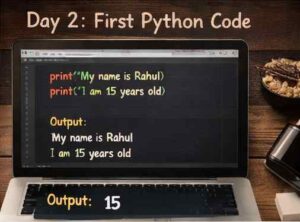
Ans- print(“My favorite subject is Math”)
Q2. Write a program to print your name and age.
Ans- print(“My name is Rahul”)
print(“I am 15 years old”)
By this we get to know that , The print() function is used to display output on the screen.
🚀 By the end of Day 2, you’ll have officially written your first code, which is a big step in your coding journey.
👉 Practice Questions:
- Write a program to print “Hello World”
- Write a program to print your name and school name
- Write a program that prints 3 different messages
- Try printing two words in a single line
📦 Day 3: Variables & Data Types (Learn to Handle Data)
Now that you’ve written your first code, it’s time to understand how to store and use data in programming. Every program works with data, and variables help you manage it easily.
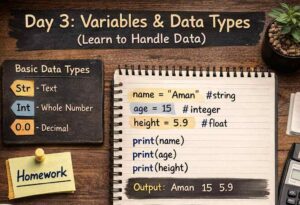
A variable is like a container that stores information. For example, you can store your name, age, or marks in variables and use them whenever needed.
There are different types of data in coding, such as:
- Text (string)
- Numbers (integers)
- Decimal values (floats)
Understanding these data types helps you write better and more accurate programs. 📊
👉 Focus for today:
- Learn what variables are and how they store data
- Understand basic data types
- Practice storing and printing different values
Example:-
Q1. Store two numbers and print their multiplication.
Ans- a = 5
b = 4
print(a * b)
Solution:
Variables a and b store values. The * operator multiplies them.
Q2. Store a decimal number and print it.
Ans- price = 99.5
print(price)
Solution:
Decimal values are stored as float type.
🚀 By the end of Day 3, you’ll be able to handle data in your programs, which is a key step in becoming comfortable with coding.
👉 Practice Questions:
- Store your name, age, and marks in variables and print them
- Store two numbers and print their sum
- Write a program to store a decimal (float) value
- Explain the difference between a string and a number with examples
🔀 Day 4: Conditions (Decision Making)
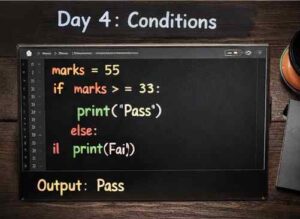
Today you’ll learn how to make your program take decisions. Until now, your code was running step by step, but with conditions, it can choose what to do based on a situation.
Conditions work using if-else statements, where the program checks something and then decides the output. For example, checking whether a number is even or odd, or whether a student has passed or failed.
This makes your programs smarter and more interactive, just like real-life decision making. 🧠
👉 Focus for today:
- Understand how if-else conditions work
- Learn how programs make decisions
- Try simple examples like pass/fail or even/odd
Example:-
Q1. Check if a number is positive or negative.
Ans- num = -5
if num > 0:
print(“Positive”)
else:
print(“Negative”)
Solution:
The program checks the condition and prints the result.
Q2. Check if a number is divisible by 5.
Ans- num = 10
if num % 5 == 0:
print(“Divisible”)
else:
print(“Not Divisible”)
Solution:
% gives remainder. If remainder is 0, number is divisible.
🚀 By the end of Day 4, you’ll be able to create programs that can think and respond based on different situations.
👉 Practice Questions:
- Write a program to check whether a number is even or odd
- Take marks as input and check pass or fail
- Take age as input and check if a person can vote
- Compare two numbers and print the greater one
🔁 Day 5: Loops (Learn to Repeat Tasks)
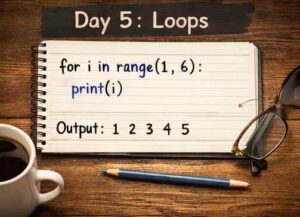
Sometimes in coding, you need to perform the same task multiple times. Instead of writing the same code again and again, loops help you repeat it easily and efficiently.
Loops allow your program to run a block of code multiple times based on a condition. For example, printing numbers from 1 to 10 or displaying a message several times. This not only saves time but also makes your code shorter and cleaner.
There are mainly two types of loops: for loops and while loops. Both are used for repetition, but in slightly different ways.
👉 Focus for today:
- Understand how loops work
- Learn the difference between for and while loops
- Practice simple programs like counting numbers or tables
Example:-
Q1. Print numbers from 1 to 5.
Ans- for i in range(1, 6):
print(i)
Solution:
Loop runs from 1 to 5 and prints each number.
Q2. Print “Hello” 3 times using while loop.
Ans- i = 1
while i <= 3:
print(“Hello”)
i += 1
Solution:
Loop repeats until condition becomes false.
🚀 By the end of Day 5, you’ll be able to write programs that can repeat tasks automatically, which is a very important concept in coding.
👉 Practice Questions:
- Print numbers from 1 to 10
- Print numbers from 10 to 1 (reverse counting)
- Print the table of 5
- Print a word 5 times using a loop
⚙️ Day 6: Functions (Smart Coding)
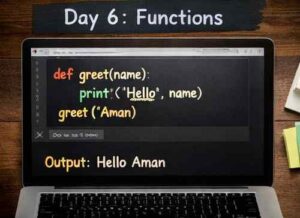
By now, you’ve learned how to write basic programs. On Day 6, you’ll learn how to make your code more organized and efficient using functions.
A function is a block of code that performs a specific task and can be reused whenever needed. Instead of writing the same code again and again, you can simply call a function, which saves time and makes your program cleaner.
Functions can also take inputs (called parameters) and return outputs, making them very powerful and flexible. This is how real-world programs are structured. 🧠
👉 Focus for today:
- Understand what functions are and why they are useful
- Learn how to create and use functions
- Try simple examples like a greeting function or a calculator
Example:-
Q1. Create a function to print your school name.
Ans- def school():
print(“ABC School”)
school()
Solution:
Function is defined and then called.
Q2. Create a function to subtract two numbers.
Ans- def subtract(a, b):
return a – b
print(subtract(10, 3))
Solution:
Function takes input and returns result.
🚀 By the end of Day 6, you’ll be able to write smarter and more structured code like a real programmer.
👉 Practice Questions:
- Create a function that prints “Hello”
- Create a function to add two numbers
- Create a function to find the square of a number
- Create a function that takes a name as input and prints a greeting
🧠 Day 7: Build Your First Mini Project
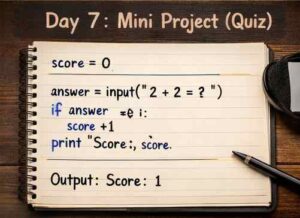
Now it’s time to use everything you’ve learned and build something on your own. This is the most important step because real learning happens when you apply your knowledge.
A mini project can be simple, like a calculator, a number guessing game, or a basic quiz. The goal is not to make something perfect, but to understand how different concepts—like variables, conditions, loops, and functions—work together in a real program.
While building your project, you might face errors or get stuck, and that’s completely normal. In fact, solving these problems will help you learn faster. 💡
👉 Focus for today:
- Choose a small and simple project
- Try to build it step by step
- Don’t worry about mistakes—learn from them
Example:-
Q1. Simple program to take input and print it.
Ans- name = input(“Enter your name: “)
print(“Hello”, name)
Solution:
input() takes user input and prints it.
Q2. Create a simple addition calculator.
Ans- a = int(input(“Enter number: “))
b = int(input(“Enter number: “))
print(“Sum:”, a + b)
Solution:
User input is converted into integer and added.
🚀 By the end of Day 7, you’ll have your first project ready, which will boost your confidence and make coding much more interesting.
👉 Practice Tasks:
- Build a simple calculator (addition and subtraction)
- Create a number guessing game
- Make a quiz program with 3 questions
- Take user input and display a result
⚡ Pro Tips (That Will Help You Improve Faster)
Learning coding is not just about watching tutorials—it’s about practicing smartly and staying consistent. If you follow the right approach, you can improve much faster. 🚀
One of the most important tips is to practice daily, even if it’s just for 30–60 minutes. Regular practice helps you understand concepts better and builds confidence over time.
Also, don’t just copy code from videos or websites. Try to understand what each line does and write it on your own. Making mistakes is completely normal—in fact, errors are one of the best ways to learn. 💡
👉 Keep these tips in mind:
- Practice consistently instead of studying for long hours once in a while
- Focus on understanding, not memorizing
- Use Google whenever you get stuck (even professionals do this)
- Start with small programs and slowly move to bigger ones
🚀 If you stay consistent and keep practicing, your coding skills will improve much faster than you expect.
❌ Common Mistakes Beginners Make
When starting coding, many beginners make small mistakes that slow down their progress. The good part is that these mistakes are very common and can be easily avoided once you’re aware of them.
One major mistake is trying to learn too many programming languages at once. This often leads to confusion. It’s always better to focus on one language (like Python) and build a strong foundation first.
Another common issue is only watching tutorials without practicing. Coding is a practical skill—you learn it by doing, not just by watching. 💻
👉 Things to avoid:
- Switching between multiple languages too quickly
- Copy-pasting code without understanding it
- Giving up when you face errors or challenges
- Comparing your progress with others
💡 Remember, every coder was once a beginner. Stay patient, keep practicing, and you’ll improve step by step.
🔥 After 7 Days – What Next?
So, you’ve completed 7 days of coding—nice start. But now comes the real part. These 7 days were just to help you understand the basics. If you stop here, you’ll forget most of it in a few days.
What you should do next is simple: keep practicing. Start by writing small programs on your own without looking at notes too much. It might feel slow at first, but that’s how you actually improve.
You can also try building slightly bigger projects, like a better calculator, a quiz game, or anything you find interesting. This will help you connect all the concepts you’ve learned.
Once you feel comfortable, you can explore areas like web development (HTML, CSS, JavaScript) or continue going deeper into Python.
The key thing to remember is: coding is not a 7-day task—it’s a skill you build over time. Just stay consistent, and you’ll see real progress. 🚀
🎯 Final Thoughts
Learning coding in 7 days is not about becoming an expert—it’s about getting started and building confidence. If you’ve followed this plan, you now have a basic understanding of how coding works, and that’s a great achievement.
The most important thing from here is consistency. You don’t need to study for long hours, but you do need to keep practicing regularly. Even a little effort every day can make a big difference over time.
Don’t worry if things feel confusing sometimes—that’s part of the process. Every programmer goes through it. What matters is that you don’t stop.
Keep learning, keep building, and most importantly, enjoy the process. 🚀
–: End of Learn Basic Coding in 7 Days (For Beginners) :–
–: also visit : —
- Best Movies Every Students Should Watch During Summer Holidays
- Top 10 Skills Every Student Should Learn This Summer (2026 Guide)
Please share with your friends
Thanks